
To turn on an ice maker, switch it to “On,” lower the shutoff arm, or press its power button.
Learning how to turn on an ice maker is simple, but the exact step depends on the refrigerator model. I have worked with many common ice maker designs, and the most frequent problems are a raised shutoff arm, a hidden power switch, or a water supply that is not open. This guide explains each method, what to check, and how to know when your ice maker is working correctly.
What Does Turning On an Ice Maker Mean?
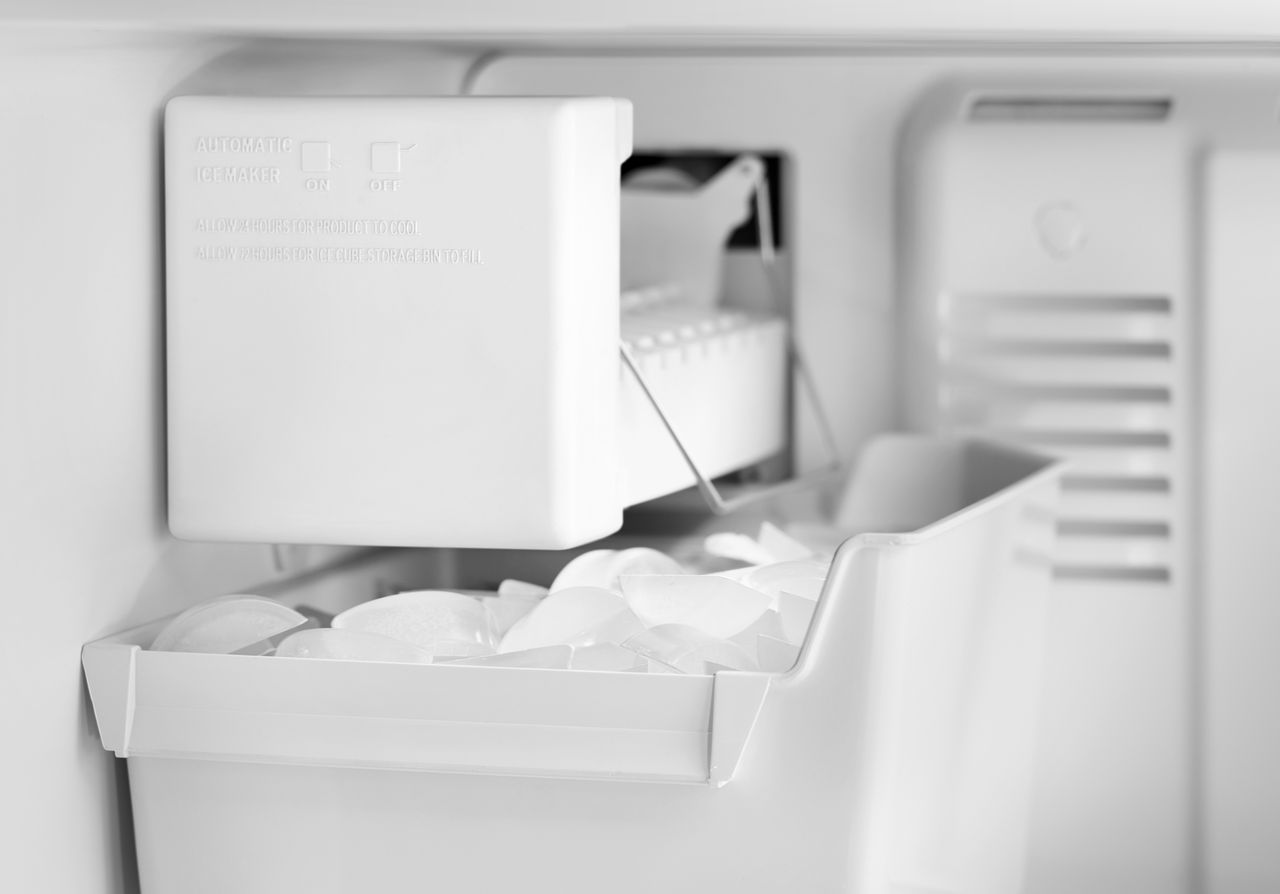
Turning on an ice maker allows the unit to fill its mold with water, freeze that water, and release the ice into the storage bin. Most refrigerator ice makers work through a small control system that monitors temperature, water flow, and ice levels.
An ice maker may be on even when it does not make ice right away. Many models need several hours to freeze the first batch. A newly installed or empty ice maker may need up to 24 hours to produce a full supply.
The ice maker may use one of these controls:
- A wire shutoff arm
- A sliding power switch
- An electronic On/Off button
- A touch control on the refrigerator display
- A small paddle or sensor system
The first step in learning how to turn on an ice maker is identifying which control your refrigerator uses.
Before You Turn On the Ice Maker
Take a few quick safety and setup steps before turning on the ice maker. These checks can prevent leaks, poor ice quality, and unnecessary service calls.
Check the water supply
Make sure the water line behind the refrigerator is connected. The shutoff valve should be open. A valve is usually open when its handle is parallel to the water line.
If your refrigerator has a water filter, confirm that the filter is installed correctly. A missing, loose, or clogged filter can reduce water flow to the ice maker.
Check the refrigerator temperature
The freezer should be cold enough to freeze water. Most manufacturers recommend a freezer setting near 0°F, although the exact setting may vary by model.
If the freezer is too warm, the ice maker may remain inactive or produce soft ice. Give the refrigerator time to reach the correct temperature after installation or a power outage.
Make sure the ice bin is in place
Some ice makers will not operate if the storage bin is missing or positioned incorrectly. Slide the bin fully into its guide rails and make sure it sits level.
Remove packing materials
A new refrigerator may contain tape, cardboard, plastic, or shipping clips near the ice maker. Remove only the materials identified for removal in the owner’s manual. Do not force parts that seem stuck.
How to Turn On an Ice Maker With a Wire Arm
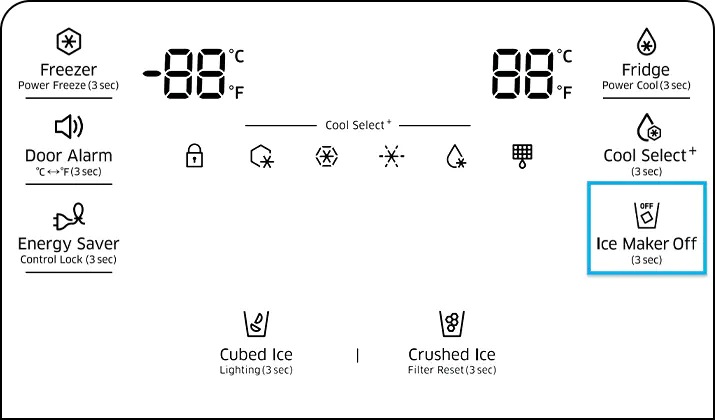
A wire shutoff arm is common in older and many standard refrigerator ice makers. The arm controls the ice maker like a simple light switch.
Follow these steps:
- Open the freezer door.
- Find the metal wire arm above or beside the ice bin.
- Lower the arm to its operating position.
- Confirm that the arm is not resting on the ice pile.
- Close the freezer door and wait several hours.
When the wire arm is raised, the ice maker is usually off. When the arm is lowered, the ice maker is usually on.
Do not push the arm down with force. If it does not move easily, ice may be blocking the mechanism. Melt the blockage with a warm, damp cloth and dry the area before trying again.
A common mistake is lowering the arm but leaving the ice bin packed too tightly. If ice presses against the arm, the ice maker may read the bin as full and stop making ice.

How to Turn On an Ice Maker With a Power Switch
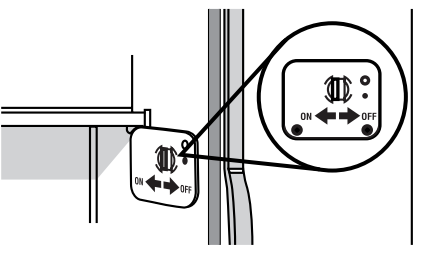
Some models have a small switch labeled On and Off. The switch may sit on the side, front, or bottom of the ice maker.
To turn on this type of ice maker:
- Open the freezer.
- Locate the switch near the ice maker assembly.
- Move the switch to the On position.
- Check that the ice bin is installed.
- Allow time for the first ice cycle.
Some switches are marked with a line and circle. The line usually means On, while the circle usually means Off. Other models use clear words or colored indicators.
If the switch feels loose or does not stay in position, stop using force. A loose switch may need repair, especially if the refrigerator has recently been moved.
Knowing how to turn on an ice maker with a power switch is useful after cleaning, moving, or defrosting a refrigerator.
How to Turn On an Electronic Ice Maker
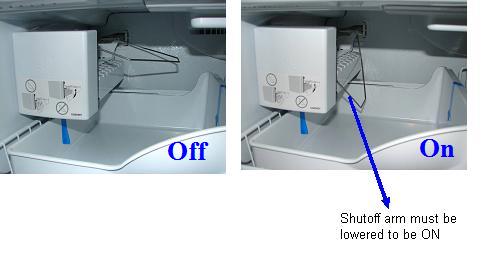
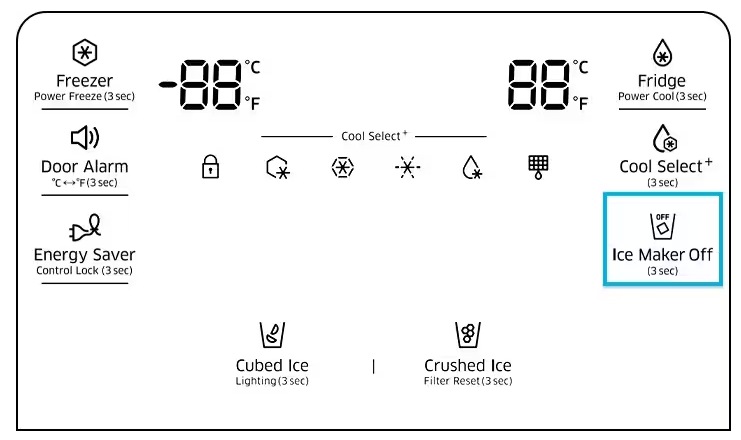
Newer refrigerators may use buttons on the door display or inside the freezer. The control may say Ice Maker, Ice On/Off, or simply Ice.
Use this general process:
- Wake the display by pressing a button.
- Find the ice maker control.
- Press the button once to select On.
- Look for an icon, light, or message that confirms operation.
- Close the door and wait for production to begin.
Some electronic models require you to hold the button for three seconds. Others use a menu on the refrigerator’s touchscreen.
Because control layouts vary, check the model manual if the button does not respond. The model number is often printed inside the refrigerator compartment, along the door frame, or behind a drawer.
Avoid pressing several controls at once. Electronic refrigerators may have separate settings for ice production, dispenser operation, and vacation mode.
How to Turn On a Refrigerator Ice Maker After Installation
A new refrigerator needs extra setup before the ice maker can work. The water line must fill, the freezer must cool, and the ice maker must complete its first cycle.
Use this order:
- Connect the refrigerator to power.
- Connect the water supply line.
- Open the water shutoff valve.
- Install the water filter if the model uses one.
- Flush the water dispenser according to the manual.
- Set the freezer near 0°F.
- Turn on the ice maker.
- Discard the first one or two batches of ice if the manual recommends it.
The first batch may contain small particles from the water line or filter. This is normal after installation or filter replacement.
Do not expect ice immediately. Depending on the design, the first batch can take several hours. A full bin may take a day or more.
How to Tell Whether the Ice Maker Is On
You can check the ice maker without taking it apart. Look for these signs:
- The wire arm is lowered.
- The power switch is set to On.
- The electronic display shows an ice symbol or On message.
- Water enters the ice mold during a cycle.
- The ice maker ejector arms move.
- New ice appears in the storage bin.
- The water dispenser has normal pressure.
Do not place your fingers inside the ice maker while it is cycling. Moving parts can pinch skin, and sharp ice can cause cuts.
If you hear a short buzzing sound, the water valve may be opening. If you hear a clicking or motor sound, the ice maker may be harvesting ice. These sounds are often normal.
In my experience, waiting is one of the hardest parts for homeowners. People often turn the ice maker off and on several times because they expect instant ice. Give the freezer time to complete a full cycle before changing the settings again.

Ice Maker Is On but Not Making Ice
If you know how to turn on an ice maker but it still produces no ice, check the basic causes first.
The freezer is too warm
An ice maker needs a cold freezer. Check the temperature with the refrigerator display or a separate appliance thermometer. Keep the door closed while the freezer cools.
The water valve is closed
Look behind the refrigerator for the shutoff valve. A closed valve prevents water from reaching the ice maker.
The water filter is blocked
A clogged filter can lower water pressure. Replace the filter with the correct model and follow the reset instructions.
The ice bin is full
Many ice makers stop when the bin reaches a certain level. Remove extra ice and ensure the shutoff arm can move freely.
Ice is frozen in the fill tube
A frozen fill tube can stop water from entering the ice mold. Unplug the refrigerator before attempting any service, and never use a knife or sharp tool to remove ice.
The refrigerator is in vacation mode
Some models stop ice production in vacation or energy-saving modes. Check the control panel for this setting.
The ice maker needs a reset
Some units have a reset button. Use it only as described in the owner’s manual. A reset may start a test cycle, but it will not repair a blocked water line or failed component.
How Long Does an Ice Maker Take to Make Ice?
Most refrigerator ice makers need several hours to produce the first batch. A completely empty bin may take 12 to 24 hours to fill, depending on the model, freezer temperature, room temperature, and how often the door is opened.
The ice maker does not usually make ice nonstop. It fills the mold, freezes the water, releases the cubes, and waits for the next cycle.
Production may slow during hot weather or when the freezer door is opened often. Frequent door openings allow warm air inside and make the compressor work harder.
If there is still no ice after 24 hours, check the water supply, filter, temperature, and On setting. If all four are correct, the unit may need professional testing.
Cleaning and Maintaining an Ice Maker
Good maintenance helps an ice maker work longer and keeps ice tasting fresh. Follow the cleaning instructions in your refrigerator manual, since removable parts differ by model.
Helpful habits include:
- Clean the ice bin regularly with mild soap and warm water.
- Rinse all washed parts well.
- Dry the bin before returning it.
- Replace the water filter on the recommended schedule.
- Keep food packages away from the ice maker.
- Remove old ice that has developed a stale taste.
- Check the water line for kinks.
- Keep the freezer at the recommended temperature.
Do not use harsh chemicals inside the ice maker unless the manufacturer approves them. Do not pour boiling water over plastic parts, because sudden heat can damage or warp them.
When I troubleshoot an ice maker, I often find that the issue began after cleaning. A bin that is damp, crooked, or not fully seated can stop the unit from operating. Always reinstall the bin carefully.
When to Call a Professional
Some problems are safe to check at home. Others require a trained appliance technician.
Arrange service if:
- The refrigerator leaks water.
- The water line is cracked.
- The ice maker makes repeated grinding sounds.
- The control switch is damaged.
- The freezer does not reach a safe temperature.
- The ice maker trips the circuit breaker.
- The unit shows an error code.
- Water continues to flow into the ice bin.
- The ice maker remains inactive after all basic checks.
Unplug the refrigerator before inspecting electrical parts. Do not remove sealed panels or test live wiring unless you have the right training and equipment.
An ice maker is a water and electrical appliance in a cold environment. Simple checks are reasonable, but repairs involving wiring, valves, or sealed cooling parts are best left to a qualified professional.
Common Mistakes to Avoid
Learning how to turn on an ice maker is easy, but a few mistakes can create new problems.
- Do not force a stuck wire arm.
- Do not chip away frozen ice with a knife.
- Do not run the ice maker without its bin if the manual says the bin is required.
- Do not ignore a water leak.
- Do not expect a full bin within minutes.
- Do not use the wrong replacement filter.
- Do not repeatedly reset the ice maker without finding the cause.
- Do not leave old ice in the bin for long periods.
The safest approach is simple: check the control, confirm water flow, verify the freezer temperature, and wait for a complete cycle.
Frequently Asked Questions About How to Turn On an Ice Maker
How do I turn on an ice maker with a wire arm?
Lower the wire arm to its operating position. A raised arm usually turns the ice maker off, while a lowered arm allows it to make ice.
How long does it take for an ice maker to start making ice?
The first batch often takes several hours. After installation, filter replacement, or a power outage, a full bin may take up to 24 hours.
Why is my ice maker on but not making ice?
Check the freezer temperature, water valve, filter, ice bin, and fill tube. If these parts are correct and there is still no ice after a day, professional service may be needed.
Should I leave the ice maker on all the time?
Yes, you can usually leave it on when you want a steady supply of ice. Turn it off by raising the arm or selecting Off when the bin is full or the refrigerator will not be used.
Do I need to reset my ice maker after turning it on?
Most ice makers do not need a reset after normal activation. Use the reset function only if the manual recommends it or the unit has stopped after basic checks.
Can I turn on an ice maker without a water line?
The ice maker may run without water, but it cannot produce ice. Keep it off until the water line is connected and the shutoff valve is open.
Conclusion
To turn on an ice maker, use the correct control for your model: lower the wire arm, move the switch to On, or activate the electronic setting. Then confirm that the freezer is cold, the water supply is open, the filter is installed, and the ice bin is in place.
Give the unit several hours to complete its first cycle, and avoid forcing frozen parts or ignoring leaks. With these simple checks, you can safely turn on an ice maker and solve many common problems at home. Check your refrigerator manual for model-specific details, and share your experience or questions in the comments.